

Prometheus + snmp_exporter
監視環境構築でハマったポイント
# はじめに
最近、会社のサーバー環境を見直す機会があり、いろいろと刷新を行っているなか、Prometheusを使ってサーバー状態を取得することにしました。

レガシーな環境もあるので未だにMunin使っていたりするのですが、Prometheus + Grafana のグラフィカルな監視画面を試してみたかったとかもあります。
Prometheus の導入までは AI に任せればサクッと終わる時代になりましたが、ついでに NAS やらルーターやらを対象に、SNMP 監視を追加しようとした瞬間に別世界へ突入しました。
とくに問題だったのが、snmp_exporter の設定ファイルを generator で生成する作業です。
ネット上には古い情報が多く、公式の仕様変更後の実例が少なく難儀しました。最初は ChatGPT や Google などのAI回答も古い情報基準だったり、まったく異なる回答をよこしたりと、ひさびさに検索しまくりな作業でした。
この記事では、今回自分が 実際にハマったポイントと、その解決方法をピンポイントでまとめます。
同じところで詰まっている人の助けになれば幸いです。
snmp_exporter のインストール
何はともあれインストールから。サービスとしての起動までえいやと実行。ここまでは簡単なんですよ……。
GitHubからLinux用のバイナリをダウンロードして、展開。適切なユーザーを作りつつsysytemdでサービスとして起動します。今回はバイナリは /usr/local/bin/ に 設定ファイルは /etc/snmp_exporter/ に配置するようにしました。導入環境は Rocky Linux 8 ですがそれ以降でも手順は変わらないはず。
$ sudo useradd --no-create-home --shell /sbin/nologin snmp_exporter
$ sudo mkdir -p /etc/snmp_exporter
$ sudo chown -R snmp_exporter:snmp_exporter /etc/snmp_exporter
$ sudo chmod 640 /etc/snmp_exporter/snmp.yml
$ sudo vi /etc/systemd/system/snmp_exporter.service
[Unit]
Description=Prometheus SNMP Exporter
After=network.target

[Service]
Type=simple
User=snmp_exporter
Group=snmp_exporter
ExecStart=/usr/local/bin/snmp_exporter --config.file=/etc/snmp_exporter/snmp.yml
Restart=on-failure

[Install]
WantedBy=multi-user.target

$ sudo systemctl daemon-reload
$ sudo systemctl enable snmp_exporter
$ sudo systemctl start snmp_exporter
$ sudo systemctl status snmp_exporter
$ ss -tulpn | grep 9116
こんな感じでサービス起動まで持っていってエラーなし、ポートリスニングしていれば導入は完了。snmp.yml についてはデフォルトのファイルとなっているため、めちゃくちゃ大量の設定が入っています。これ、自動生成されてるんですよね……。手動で設定ファイル書けないような複雑な構成って、なかなかにハードルを上げてくれます。
Synology の NAS の情報取得は簡単
で、動かすところまでは問題なくて、Synology の NAS 用の設定も、Grafanaのダッシュボードとセットで提供されていたのでそれを使用。
GitHubから snmp.yml が取得できるので、SNMPv3設定部分を編集して NAS のデータを取得できるようにしました。上手く接続できるとsnmp_exporter のWeb画面でこんな感じになります。
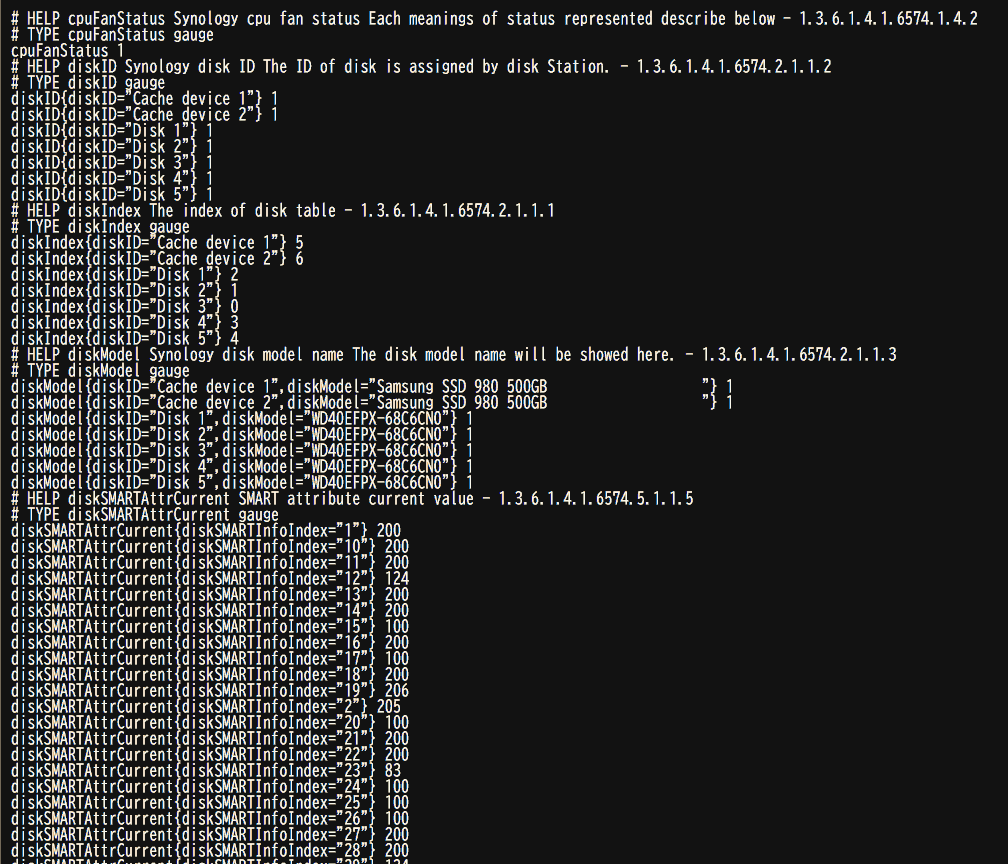
Prometheus側での情報取得は、/etc/prometheus/prometheus.ymlの scrape_configs にSNMP用の設定を追加してやります。
scrape_configs:
  - job_name: 'snmp-synology'
    metrics_path: /snmp
    params:
      module: [synology]
      auth:   [public_v2]
    static_configs:
      - targets:
          - 192.168.15.220      #NASのIPアドレス
    relabel_configs:
      - source_labels: [__address__]
        target_label: __param_target
      - source_labels: [__param_target]
        target_label: instance
      - target_label: __address__
        replacement: 127.0.0.1:9116  # snmp_exporter のアドレス
そして、Grafana側でダッシュボードをインポートしてPrometheusと接続すると、以下のように良い感じにデータが取れました。すごく……きれいです。
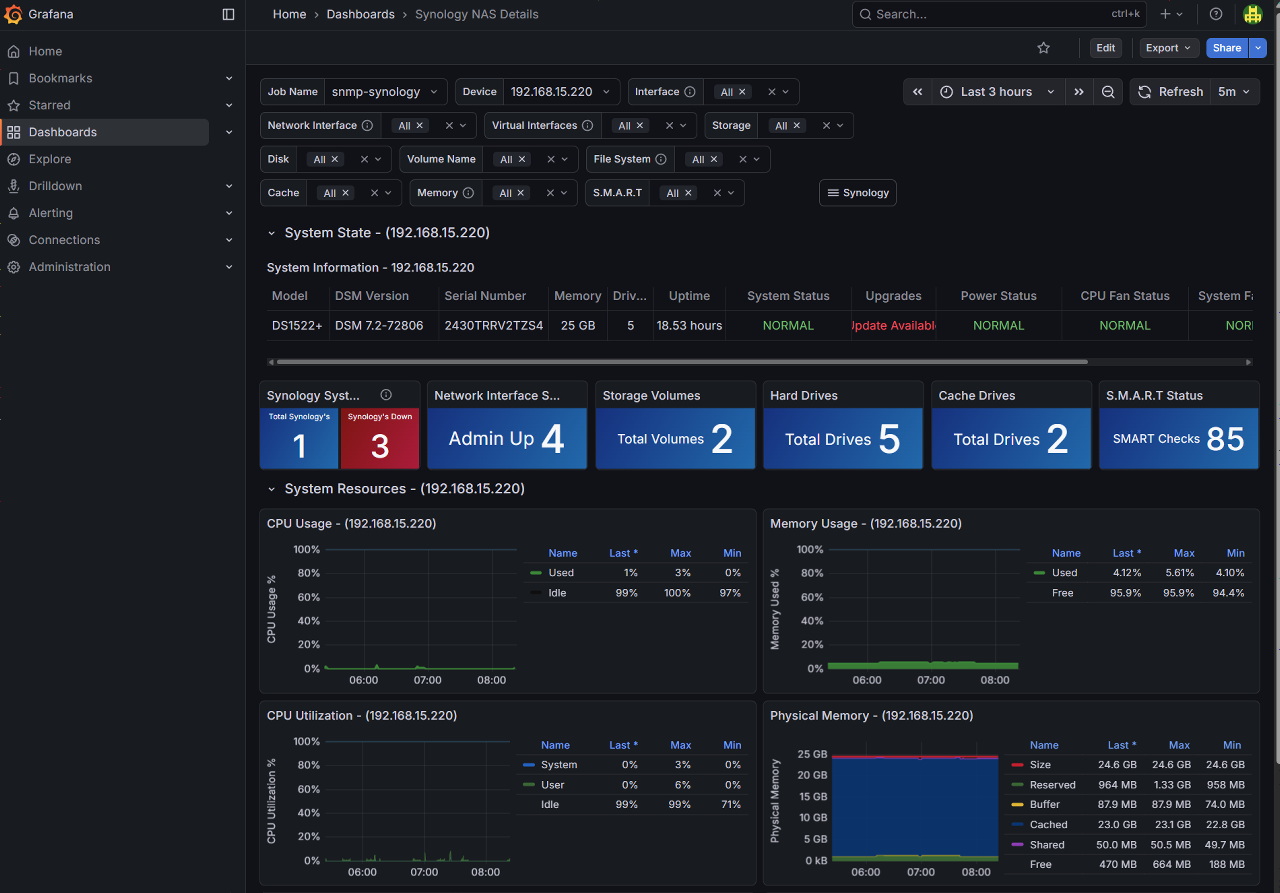
そして、いざ YAMAHA RTX-830 の情報を取得しようという段階になってからが長かった。
YAMAHA用のsnmp.ymlが作れない……
snmp_exporter 用 generatorの仕様変更でネット情報との齟齬が多い
2年ほど前のバージョンアップで、設定ファイルが非互換になり、それ以前のgenerator用の generator.yml もそのままでは使用できなくなっています。ここがなかなかにきつかった。変更後の設定ファイル生成に関する情報が日本語環境では多く見つからず、ChatGPTも勘違いした情報を返して、誤った内容で設定を出してきたりと混乱。Google検索でも、ChatGPTと似た感じで、認証情報を別ファイルに保存するというような完全誤情報をAI要約で出してくる物だからワケが分かりません。
field version not found in type config.plain
field auth not found in type config.plain
のようなエラーで原因は分かりつつも、肝心の generator を通る形式に書き換えるのに難儀しました。これは自分の知識不足もありますが、AIの提案をそのまま使うと遠回りしてしまう実例だなあと反省。
RTX830監視用の設定については以下のサイトを参考にしつつ頑張りましたが、最終的には新形式のフォーマットを理解するのに時間を掛けてしまいました。
YAMAHA の private MIB がパースできない
前述のフォーマット変更をようやく理解して、ごくごくシンプルな設定ファイルがエラーなくgeneratorを通過するようになりました。
参考サイトを見ながら、YAMAHAのプラベートMIBをダウンロードしてYAMAHAルーター用に書き換えた設定で、generatorを実行するとパースエラー。
-m オプションでプライベートMIBを保存したディレクトリを指定して、生成を実行するとこんな感じに。
$ ./generator -m yamaha-private-mib generate
time=2025-12-07T09:16:38.571+09:00 level=INFO source=net_snmp.go:174 msg="Loading MIBs" from=yamaha-private-mib
time=2025-12-07T09:16:38.584+09:00 level=WARN source=main.go:177 msg="NetSNMP reported parse error(s)" errors=2149
time=2025-12-07T09:16:38.584+09:00 level=ERROR source=main.go:183 msg="Missing MIB" mib=SNMPv2-SMI from="At line 7 in yamaha-private-mib/yamaha-smi.mib.txt"
time=2025-12-07T09:16:38.584+09:00 level=ERROR source=main.go:183 msg="Missing MIB" mib=SNMPv2-SMI from="At line 11 in yamaha-private-mib/yamaha-sw-termmon.mib.txt"
time=2025-12-07T09:16:38.584+09:00 level=ERROR source=main.go:183 msg="Missing MIB" mib=SNMPv2-SMI from="At line 11 in yamaha-private-mib/yamaha-sw-power-ethernet.mib.txt"
time=2025-12-07T09:16:38.584+09:00 level=ERROR source=main.go:183 msg="Missing MIB" mib=SNMPv2-SMI from="At line 7 in yamaha-private-mib/yamaha-sw-l2ms.mib.txt"
time=2025-12-07T09:16:38.584+09:00 level=ERROR source=main.go:183 msg="Missing MIB" mib=SNMPv2-SMI from="At line 11 in yamaha-private-mib/yamaha-sw-hardware.mib.txt"
time=2025-12-07T09:16:38.584+09:00 level=ERROR source=main.go:183 msg="Missing MIB" mib=SNMPv2-SMI from="At line 9 in yamaha-private-mib/yamaha-sw-firmware.mib.txt"
time=2025-12-07T09:16:38.584+09:00 level=ERROR source=main.go:183 msg="Missing MIB" mib=SNMPv2-SMI from="At line 7 in yamaha-private-mib/yamaha-sw-errdisable.mib.txt"
time=2025-12-07T09:16:38.584+09:00 level=ERROR source=main.go:183 msg="Missing MIB" mib=SNMPv2-SMI from="At line 7 in yamaha-private-mib/yamaha-rt-switch.mib.txt"
time=2025-12-07T09:16:38.584+09:00 level=ERROR source=main.go:183 msg="Missing MIB" mib=SNMPv2-SMI from="At line 7 in yamaha-private-mib/yamaha-rt-ip.mib.txt"
time=2025-12-07T09:16:38.584+09:00 level=ERROR source=main.go:183 msg="Missing MIB" mib=IANAifType-MIB from="At line 15 in yamaha-private-mib/yamaha-rt-ip.mib.txt"
time=2025-12-07T09:16:38.584+09:00 level=ERROR source=main.go:183 msg="Missing MIB" mib=SNMPv2-SMI from="At line 7 in yamaha-private-mib/yamaha-rt-interfaces.mib.txt"
time=2025-12-07T09:16:38.584+09:00 level=ERROR source=main.go:183 msg="Missing MIB" mib=IANAifType-MIB from="At line 15 in yamaha-private-mib/yamaha-rt-interfaces.mib.txt"
time=2025-12-07T09:16:38.584+09:00 level=ERROR source=main.go:183 msg="Missing MIB" mib=SNMPv2-SMI from="At line 7 in yamaha-private-mib/yamaha-rt-hardware.mib.txt"
time=2025-12-07T09:16:38.584+09:00 level=ERROR source=main.go:183 msg="Missing MIB" mib=SNMPv2-SMI from="At line 7 in yamaha-private-mib/yamaha-rt-firmware.mib.txt"
time=2025-12-07T09:16:38.584+09:00 level=ERROR source=main.go:135 msg="Failing on reported parse error(s)" help="Use 'generator parse_errors' command to see errors, --no-fail-on-parse-errors to ignore"
パースエラーのメッセージを元に、MIBファイル保存したディレクトリに対してチェックを実行すると絶望的なエラーの量。どうやら他の依存しているMIBが同じディレクトリにないため、発生していた模様。
$  ./generator parse_errors -m ./yamaha-private-mib
time=2025-12-07T09:18:39.070+09:00 level=INFO source=net_snmp.go:174 msg="Loading MIBs" from=./yamaha-private-mib
time=2025-12-07T09:18:39.084+09:00 level=WARN source=main.go:177 msg="NetSNMP reported parse error(s)" errors=2149
time=2025-12-07T09:18:39.085+09:00 level=ERROR source=main.go:183 msg="Missing MIB" mib=SNMPv2-SMI from="At line 7 in ./yamaha-private-mib/yamaha-smi.mib.txt"
time=2025-12-07T09:18:39.085+09:00 level=ERROR source=main.go:183 msg="Missing MIB" mib=SNMPv2-SMI from="At line 11 in ./yamaha-private-mib/yamaha-sw-termmon.mib.txt"
time=2025-12-07T09:18:39.085+09:00 level=ERROR source=main.go:183 msg="Missing MIB" mib=SNMPv2-SMI from="At line 11 in ./yamaha-private-mib/yamaha-sw-power-ethernet.mib.txt"
time=2025-12-07T09:18:39.085+09:00 level=ERROR source=main.go:183 msg="Missing MIB" mib=SNMPv2-SMI from="At line 7 in ./yamaha-private-mib/yamaha-sw-l2ms.mib.txt"
time=2025-12-07T09:18:39.085+09:00 level=ERROR source=main.go:183 msg="Missing MIB" mib=SNMPv2-SMI from="At line 11 in ./yamaha-private-mib/yamaha-sw-hardware.mib.txt"
time=2025-12-07T09:18:39.085+09:00 level=ERROR source=main.go:183 msg="Missing MIB" mib=SNMPv2-SMI from="At line 9 in ./yamaha-private-mib/yamaha-sw-firmware.mib.txt"
time=2025-12-07T09:18:39.085+09:00 level=ERROR source=main.go:183 msg="Missing MIB" mib=SNMPv2-SMI from="At line 7 in ./yamaha-private-mib/yamaha-sw-errdisable.mib.txt"
time=2025-12-07T09:18:39.085+09:00 level=ERROR source=main.go:183 msg="Missing MIB" mib=SNMPv2-SMI from="At line 7 in ./yamaha-private-mib/yamaha-rt-switch.mib.txt"
time=2025-12-07T09:18:39.085+09:00 level=ERROR source=main.go:183 msg="Missing MIB" mib=SNMPv2-SMI from="At line 7 in ./yamaha-private-mib/yamaha-rt-ip.mib.txt"
time=2025-12-07T09:18:39.085+09:00 level=ERROR source=main.go:183 msg="Missing MIB" mib=IANAifType-MIB from="At line 15 in ./yamaha-private-mib/yamaha-rt-ip.mib.txt"
time=2025-12-07T09:18:39.085+09:00 level=ERROR source=main.go:183 msg="Missing MIB" mib=SNMPv2-SMI from="At line 7 in ./yamaha-private-mib/yamaha-rt-interfaces.mib.txt"
time=2025-12-07T09:18:39.085+09:00 level=ERROR source=main.go:183 msg="Missing MIB" mib=IANAifType-MIB from="At line 15 in ./yamaha-private-mib/yamaha-rt-interfaces.mib.txt"
time=2025-12-07T09:18:39.085+09:00 level=ERROR source=main.go:183 msg="Missing MIB" mib=SNMPv2-SMI from="At line 7 in ./yamaha-private-mib/yamaha-rt-hardware.mib.txt"
time=2025-12-07T09:18:39.085+09:00 level=ERROR source=main.go:183 msg="Missing MIB" mib=SNMPv2-SMI from="At line 7 in ./yamaha-private-mib/yamaha-rt-firmware.mib.txt"
MIB search path: ./yamaha-private-mib
Cannot find module (SNMPv2-SMI): At line 7 in ./yamaha-private-mib/yamaha-smi.mib.txt
Did not find 'enterprises' in module #-1 (./yamaha-private-mib/yamaha-smi.mib.txt)
Unlinked OID in YAMAHA-SMI: yamaha ::= { enterprises 1182 }
Undefined identifier: enterprises near line 9 of ./yamaha-private-mib/yamaha-smi.mib.txt
Did not find 'yamahaSW' in module YAMAHA-SMI (./yamaha-private-mib/yamaha-sw.mib.txt)
Unlinked OID in YAMAHA-SW: yamahaSWVrrp ::= { yamahaSW 12 }

以下2000行近く続くため省略
これ-mオプションを付けると、そのディレクトリしか使用しなくなるため、標準的なMIBリストが格納されている /usr/share/snmp/mibs が無視されていたのが原因でした。-m オプションを付けずに実行すると、デフォルトで読み取るディレクトリがどこなのかが表示されていました。面倒がないようにするなら、プライベートMIBのディレクトリは ホームディレクトリ直下に .snmp/miibs/ というフォルダを作って格納しておけということのようです。
$  ./generator  generate
time=2025-12-07T18:15:16.973+09:00 level=INFO source=net_snmp.go:174 msg="Loading MIBs" from=$HOME/.snmp/mibs:/usr/share/snmp/mibs
time=2025-12-07T18:15:17.026+09:00 level=INFO source=main.go:55 msg="Generating config for module" module=rtx830
time=2025-12-07T18:15:17.029+09:00 level=ERROR source=main.go:139 msg="Error generating config netsnmp" err="cannot find oid 'yrhCpuUtil5sec' to walk"
そのため、以下のようにして実行すると、パースエラーも解消。
$  ./generator parse_errors -m "./yamaha-private-mib:/usr/share/snmp/mibs"
time=2025-12-07T09:20:05.674+09:00 level=INFO source=net_snmp.go:174 msg="Loading MIBs" from=./yamaha-private-mib:/usr/share/snmp/mibs
time=2025-12-07T09:20:05.719+09:00 level=INFO source=main.go:147 msg="No parse errors"
YAMAHAルーターから5秒CPU利用率だけ取ってくるシンプルな生成ファイルも無事に通りました。
$ cat generator.yml
auths:
  synology_v3_auth:
    version: 3
    username: "snmpuser"
    security_level: authPriv
    auth_protocol: SHA
    password: "AUTH_PASS"        # 認証パスワード
    priv_protocol: AES
    priv_password: "PRIV_PASS"   # 暗号パスワード

modules:
  rtx830:
    walk:
      - yrhCpuUtil5sec

$  ./generator -m "./yamaha-private-mib:/usr/share/snmp/mibs" generate
time=2025-12-07T09:25:19.822+09:00 level=INFO source=net_snmp.go:174 msg="Loading MIBs" from=./yamaha-private-mib:/usr/share/snmp/mibs
time=2025-12-07T09:25:19.867+09:00 level=INFO source=main.go:55 msg="Generating config for module" module=rtx830
time=2025-12-07T09:25:19.870+09:00 level=INFO source=main.go:73 msg="Generated metrics" module=rtx830 metrics=1
time=2025-12-07T09:25:19.871+09:00 level=INFO source=main.go:98 msg="Config written" file=/home/yhori/snmp_exporter/generator/snmp.yml
ようやく生成されたsnmp.yml
$ cat snmp.yml
# WARNING: This file was auto-generated using snmp_exporter generator, manual changes will be lost.
auths:
  synology_v3_auth:
    community: public
    security_level: authPriv
    username: snmpuser
    password: AUTH_PASS
    auth_protocol: SHA
    priv_protocol: AES
    priv_password: PRIV_PASS
    version: 3
modules:
  rtx830:
    get:
    - 1.3.6.1.4.1.1182.2.1.5.0
    metrics:
    - name: yrhCpuUtil5sec
      oid: 1.3.6.1.4.1.1182.2.1.5
      type: gauge
      help: The average utilization of CPU in 5 seconds. - 1.3.6.1.4.1.1182.2.1.5
ここまで長かった……。
ということで、知ってる人はメッセージとか見てもっと早く解決できるんだと思います。MIBファイルの読み込みディレクトリもエラーメッセージにヒントはありました。ありましたけどさあっ。
そしてオチが
はい、延々と遠回りしてきたんですが、snmp_exporter の 2.90 のリリースノートにAdd Yamaha RT Series module という記述があるのを後で見つけて転げ回りました。
今までの苦労は一体……。
検索で引っかからなさすぎて全然注意して見てなかった。灯台下暗しを地で行きつつも、いろいろ勉強になった半日でした。


コメント